
YouTube Creator Demo: Included Pages & How to Customize It
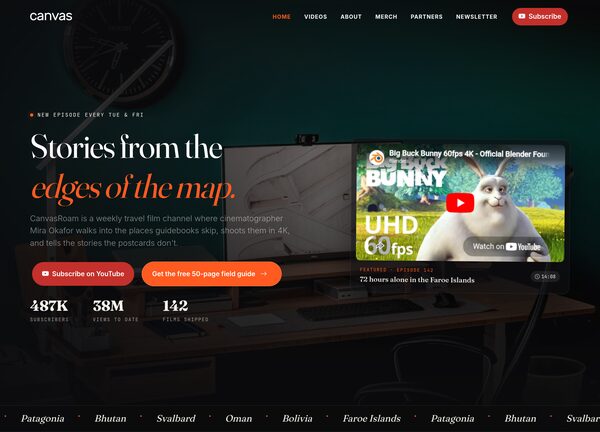
The Canvas YouTube Creator demo is built for video storytellers who want a homepage that feels like a channel trailer. It ships with a single landing page that combines an immersive hero, an embedded showcase reel, a content grid for latest uploads, an about section for the creator, a stats strip for subscribers and views, and a newsletter signup, all wrapped in a cinematic dark layout with a transparent header.
Designed in a stretched format with a medium header, the page leans into moody, editorial typography using Fraunces for display headings, Inter for body copy, and JetBrains Mono for metadata and tags. A signature accent of #FF5A1F cuts through the dark palette, giving every thumbnail, label, and call to action a warm, screen-burning glow that suits travel vlogs, documentary channels, and creators who film their own adventures.
What's included
| Page | Description |
|---|---|
demo-youtube-creator.html |
CanvasRoam - Cinematic Travel Stories from Off the Map / Canvas: a one-page portfolio that frames a travel filmmaker's brand, reels, and recent uploads with a transparent navigation bar, a hero with embedded trailer, a featured videos grid, an about and stats block, and a footer newsletter signup. |
The demo's own styles live in demos/youtube-creator/youtube-creator.css. Shared framework styles come from style.css and css/font-icons.css.
The full editing guide is in the dashboard
Step-by-step customization, the complete settings reference, and copy-paste code are available to registered Canvas users. Creating an account is free.
Required files
CSS: demos/youtube-creator/youtube-creator.css