
Bookkeeping Demo: Included Pages & How to Customize It
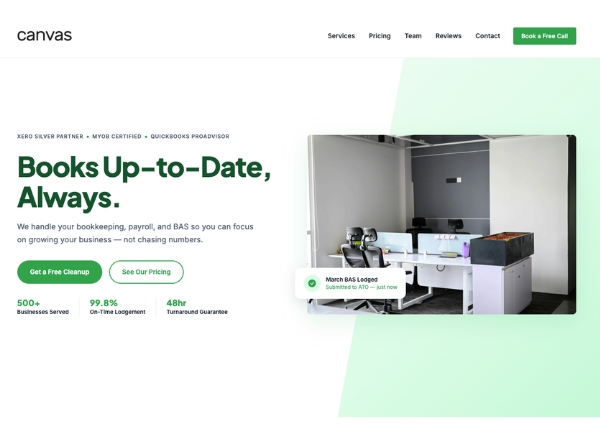
The Bookkeeping demo of Canvas is built for accountants, bookkeepers, and small business owners who want a clean, trustworthy online presence. It pairs a calm green palette with structured layouts so firms can present services, pricing, and credentials without visual clutter. Pages are written for real workflows: showing what the practice does, who it serves, how to start working together, and where to find answers.
Beyond the homepage, the demo includes inner pages that cover the practical questions prospects ask before signing on. The tone is professional and straightforward, leaning on clear typography and generous spacing rather than decorative flourishes. Everything stretches edge to edge for a modern, confident feel, and the theme color can be swapped to match any brand identity.
What's included
| Page | Description |
|---|---|
demo-bookkeeping.html |
The single landing page presents ClearLedger Bookkeeping with a hero, service overview, process steps, pricing tiers, FAQ, and contact section designed to convert visitors into clients. |
The demo's own styles live in demos/bookkeeping/bookkeeping.css. Shared framework styles come from style.css and css/font-icons.css.
The full editing guide is in the dashboard
Step-by-step customization, the complete settings reference, and copy-paste code are available to registered Canvas users. Creating an account is free.
Required files
CSS: demos/bookkeeping/bookkeeping.css