
Gaming Demo: Included Pages & How to Customize It
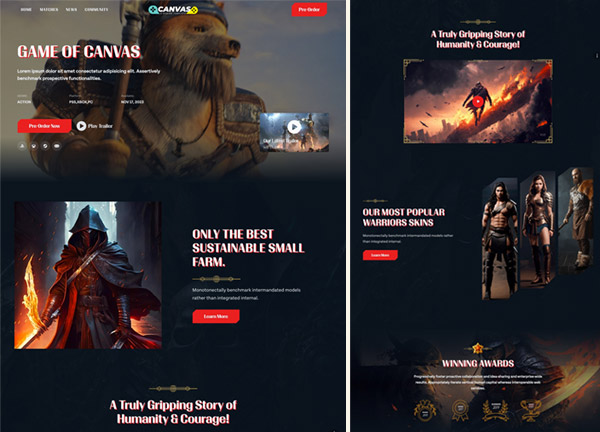
Canvas powers a wide range of ready-to-launch demos, and the gaming build is tuned for studios, indie devs, esports teams, and arcade-style creators who want their site to feel like the first level of a game. The demo lays out everything you need to announce a title, build hype, and let players jump into the action, all wrapped in Canvas's flexible HTML5 framework. With stretched layouts, smooth page transitions, a transparent header over a themed dark palette, and the bold red (#e62429) Canvas accent color, this niche leans into a high-energy, controller-friendly aesthetic that matches the intensity of the genre.
This documentation page lists every page included in the gaming demo so you know exactly what you can remix or relaunch for your own project. Each entry below describes one screen from the build, giving you a clear map of the story the demo tells and the features Canvas exposes for gamers, streamers, and event organizers.
What's included
| Page | Description |
|---|---|
demo-gaming.html |
A landing page for an action game that opens with a hero, gameplay showcase, feature breakdown, news, and community sections to convert visitors into players. |
The demo's own styles live in demos/gaming/gaming.css. Shared framework styles come from style.css and css/font-icons.css.
The full editing guide is in the dashboard
Step-by-step customization, the complete settings reference, and copy-paste code are available to registered Canvas users. Creating an account is free.
Required files
CSS: demos/gaming/gaming.css