
Real Estate 2 Demo: Included Pages & How to Customize It
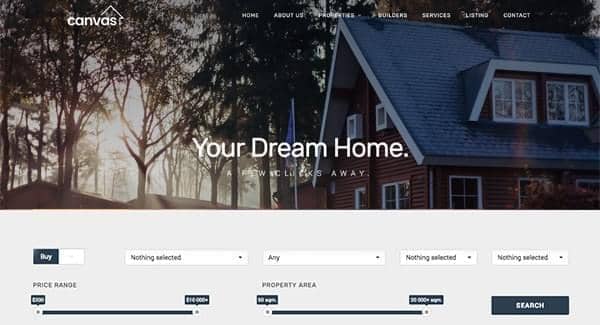
Canvas ships with a wide range of niche demos, and the Real Estate 2 build is tailored for agencies, independent agents, and property portals who need a credible storefront without building from scratch. It includes a curated set of pages focused on listings, search, agent profiles, and lead capture, so a brokerage can move from install to live site quickly.
The look is editorial and trustworthy, pairing the default Canvas theme with the Roboto, Rubik, and Lora font stack. A stretched layout, dark styling, and a transparent header give the demo a modern, premium feel, while the side push panel keeps navigation tidy on listing and map-heavy screens. Header sizing is set to medium so property categories and contact actions stay within easy reach.
What's included
| Page | Description |
|---|---|
demo-real-estate-2.html |
A real estate landing page combining featured property listings, an advanced property search, neighborhood highlights, agent spotlights, and contact forms to convert visitors into inquiries. |
The full editing guide is in the dashboard
Step-by-step customization, the complete settings reference, and copy-paste code are available to registered Canvas users. Creating an account is free.