
Blog Demo: Included Pages & How to Customize It
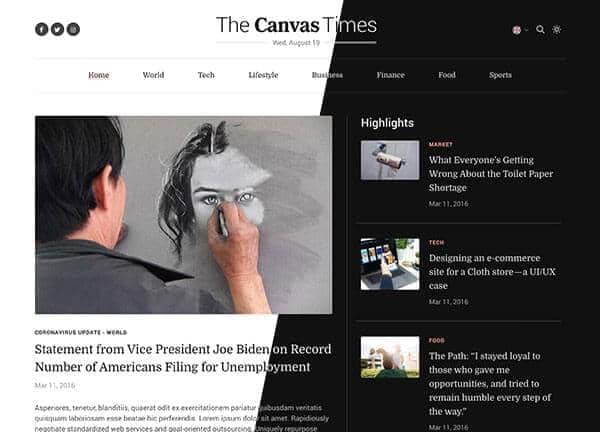
Canvas includes a complete Blog demo built for writers, editors, and online publications that want a clean reading experience without sacrificing visual character. It pairs a warm coral theme color with the literary feel of Domine and Literata, balanced by the everyday clarity of Roboto, giving every page a calm, editorial tone. Stretched layouts, a custom header size, and a full-screen search overlay help readers move through articles, categories, and features without distraction.
The demo ships with five pages that cover the full content lifecycle: a homepage with featured stories and trending widgets, a category index, an editorial travel section, a light variant for casual reading, and a single post template that demonstrates how long-form articles, sidebars, and author details come together. Together they form a ready-made starting point for magazines, personal journals, niche news sites, and content-driven brands.
What's included
| Page | Description |
|---|---|
demo-blog.html |
A news and magazine homepage layout featuring hero stories, article grids, and trending post widgets designed to showcase editorial content at a glance. |
demo-blog-categories.html |
A lifestyle-focused category index page that organizes posts by topic with filters and featured collection banners for easy browsing. |
demo-blog-editorial.html |
An editorial travel and culture section with destination features, photo-led story cards, and curated reads tailored to lifestyle journalism. |
demo-blog-light.html |
A light, content-first blog layout highlighting the latest stories and guides with generous whitespace and a softer visual treatment. |
demo-blog-single.html |
A single article template for online conferences that demonstrates long-form typography, pull quotes, author bios, related posts, and sticky share tools. |
The demo's own styles live in demos/blog/blog.css. Shared framework styles come from style.css and css/font-icons.css.
The full editing guide is in the dashboard
Step-by-step customization, the complete settings reference, and copy-paste code are available to registered Canvas users. Creating an account is free.
Required files
CSS: demos/blog/blog.css