
Covid Care Demo: Included Pages & How to Customize It
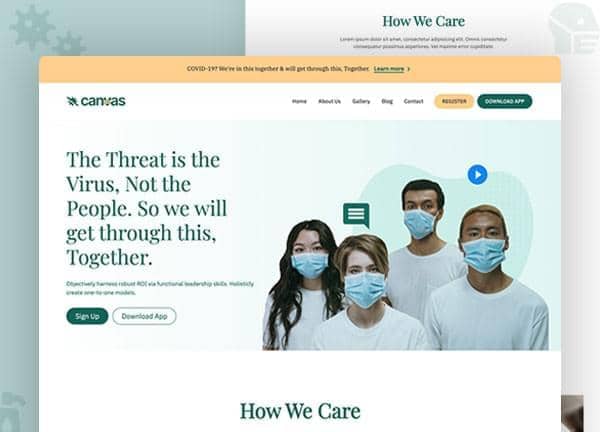
Canvas ships a dedicated Covid Care demo built for clinics, telehealth providers, and healthcare startups responding to the pandemic and beyond. The layout is stretched edge to edge, styled in a calm clinical green (#0F6458), and pairs IBM Plex Sans with IBM Plex Serif and Playfair Display for a confident mix of medical authority and editorial polish.
Five ready made pages cover the full patient journey: a high converting home page, an About page for the care team, a Services overview, a Blog for coronavirus updates, and a Contact page with appointment booking. Each page is structured so you can swap copy, images, and brand details without touching the underlying HTML.
What's included
| Page | Description |
|---|---|
demo-covid-care.html |
The landing page for COVID Care & Telemedicine Clinic introduces the practice, promotes online consultations, and routes visitors to testing, treatment, and booking. |
demo-covid-care-about.html |
The About Us page tells the clinic's pandemic response story, introduces the medical team, and lists credentials and patient focused values. |
demo-covid-care-blog.html |
The Blog page indexes the latest coronavirus news, health advisories, and clinic announcements in a clean reading layout. |
demo-covid-care-contact.html |
The Contact page provides clinic locations, a booking form, phone numbers, and a map for in person or remote appointments. |
demo-covid-care-services.html |
The Services page outlines COVID testing, telehealth consultations, in home care, vaccination programs, and post recovery support packages. |
The demo's own styles live in demos/covid-care/covid-care.css. Shared framework styles come from style.css and css/font-icons.css.
The full editing guide is in the dashboard
Step-by-step customization, the complete settings reference, and copy-paste code are available to registered Canvas users. Creating an account is free.
Required files
CSS: demos/covid-care/covid-care.css