
Ebook Demo: Included Pages & How to Customize It
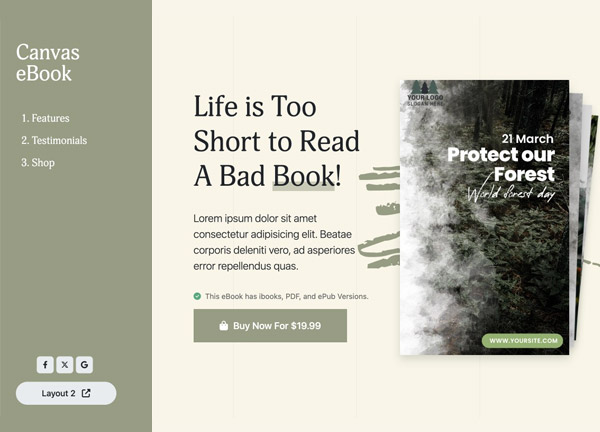
Canvas includes a dedicated set of demo pages designed for authors, publishers, and coaches who sell digital reading material. The layout combines a stretched canvas with a persistent side header, giving the design room for large cover art and long-form marketing copy without competing with the navigation. It is built for product launches, pre-orders, and reader magnet funnels where the cover image is the centerpiece of the page.
Two ready-to-edit pages cover the full reader journey, from a high-impact landing page that introduces the book to a secondary page aimed at list-building and reader engagement. Typography follows Canvas theme defaults and the color palette stays light, keeping attention on the cover artwork, chapter previews, and call-to-action buttons. The result is a clean, editorial-style presentation that adapts easily to fiction, non-fiction, courses, or guides.
What's included
| Page | Description |
|---|---|
demo-ebook.html |
A complete eBook landing page built around a hero cover image, book description, author bio, testimonials, and a purchase call-to-action. |
demo-ebook-2.html |
A companion eBook landing page focused on lead generation, offering chapter previews, newsletter signup, and bonus content downloads. |
The demo's own styles live in demos/ebook/ebook.css. Shared framework styles come from style.css and css/font-icons.css.
The full editing guide is in the dashboard
Step-by-step customization, the complete settings reference, and copy-paste code are available to registered Canvas users. Creating an account is free.
Required files
CSS: demos/ebook/ebook.css