
Interior Design Demo: Included Pages & How to Customize It
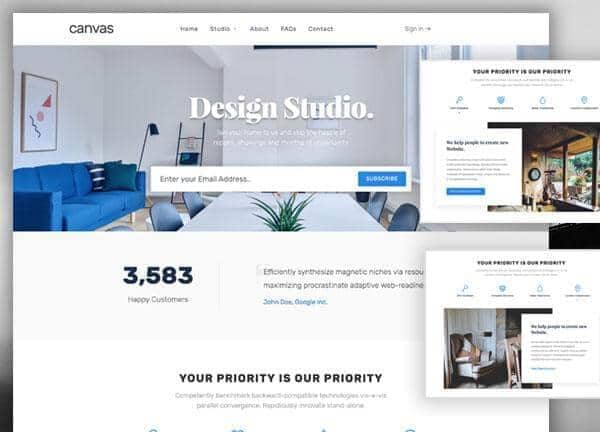
Canvas is a multipurpose HTML5 website template, and this demo reimagines it for an interior design studio that wants a refined online presence. The layout is stretched with a medium header, a side push panel for off-canvas navigation, and the Rubik and Playfair Display pairing to balance modern sans serif clarity with editorial serif elegance. The primary theme color is #1c85e8, a confident blue that anchors the typography and accent details throughout. Six pages are included, covering the studio showcase, an about page, contact, FAQs, a single project template, and a list of studio projects.
The demo is built for boutique residential and commercial designers who want to present portfolio work, explain their process, and make it easy for prospective clients to get in touch. Its design personality is calm and considered, relying on generous whitespace, large imagery, and a clear typographic hierarchy rather than visual noise.
What's included
| Page | Description |
|---|---|
demo-interior-design.html |
Acts as the homepage for the Interior Design Studio demo, presenting a first impression of the brand and routing visitors to the key sections of the site. |
demo-interior-design-about.html |
Tells the story of the studio, covering the team, philosophy, and background that establish credibility with potential clients. |
demo-interior-design-contact.html |
Provides the contact details, inquiry form, and location information that allow visitors to start a project conversation. |
demo-interior-design-faqs.html |
Addresses common questions about the studio's services, process, timelines, and pricing to reduce friction before a first call. |
demo-interior-design-studio-single.html |
Serves as a single project template, in this example showcasing a studio project in Minsk, Belarus, with imagery and detailed case study content. |
demo-interior-design-studio.html |
Lists the studio's portfolio of projects, allowing visitors to browse completed work and click into individual case studies. |
The demo's own styles live in demos/interior-design/interior-design.css. Shared framework styles come from style.css and css/font-icons.css.
The full editing guide is in the dashboard
Step-by-step customization, the complete settings reference, and copy-paste code are available to registered Canvas users. Creating an account is free.
Required files
CSS: demos/interior-design/interior-design.css