
Yoga Demo: Included Pages & How to Customize It
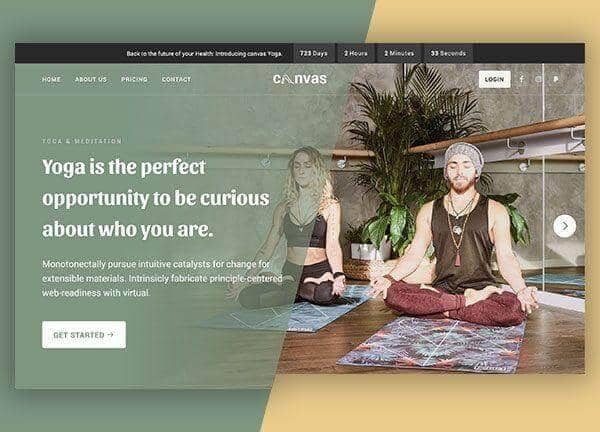
The Yoga demo is a Canvas niche skin built for independent teachers, neighborhood studios, and wellness brands that want a calm, focused online home. It ships with five ready to use pages covering class schedules, a studio story, contact details, a member login, and a pricing table for memberships and drop in passes. The layout is fully stretched with a full width header, a sticky footer, and a custom header height that gives the brand mark room to breathe.
The design personality is grounded and restorative, anchored by the sage green theme color and the rounded Sansita headings paired with the clean, readable Roboto body font. Soft contrast, generous spacing, and natural photography placeholders help every page feel like an exhale rather than a sales pitch.
What's included
| Page | Description |
|---|---|
demo-yoga.html |
Class schedule and studio landing page that opens the brand, highlights today's sessions, and invites visitors to book or sign up. |
demo-yoga-about-us.html |
Studio story page covering teacher bios, philosophy, and the space itself so newcomers feel welcome before their first class. |
demo-yoga-contact-us.html |
Contact page with a form, studio address, hours, and phone or email details for inquiries and class questions. |
demo-yoga-login.html |
Member login page where returning students sign in to manage bookings, view history, and update their account. |
demo-yoga-pricing.html |
Membership and pricing page laying out drop in rates, class packs, and recurring plans in an easy to compare layout. |
The demo's own styles live in demos/yoga/yoga.css. Shared framework styles come from style.css and css/font-icons.css.
The full editing guide is in the dashboard
Step-by-step customization, the complete settings reference, and copy-paste code are available to registered Canvas users. Creating an account is free.
Required files
CSS: demos/yoga/yoga.css