
Hosting Demo: Included Pages & How to Customize It
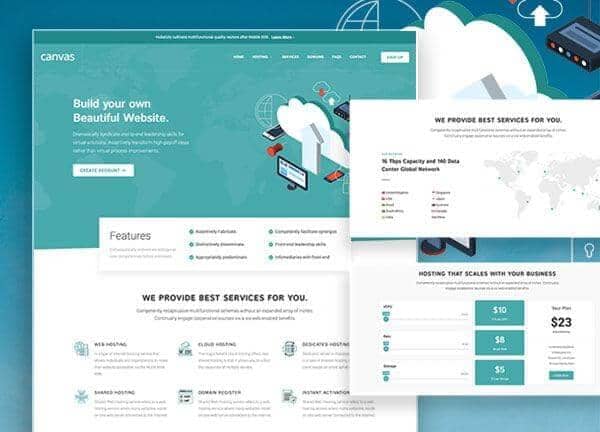
Canvas ships with a dedicated demo for hosting providers, web agencies, and anyone offering server or domain services. The layout is stretched for a roomy, content-led reading experience and uses a clean light palette accented by a calm teal tone. Typography pairs Roboto for body text with Istok Web for headings, giving the site a modern, technical feel that still reads warmly for general visitors.
This demo includes a polished homepage along with the supporting inner pages you need to cover your full funnel. Every page is built on the same components and styling system as the rest of Canvas, so you can mix and match sections, swap in your own brand colors, and extend the design without rewriting markup. It is a practical starting point rather than a finished site, ready for your plans, pricing, and support details.
What's included
| Page | Description |
|---|---|
demo-hosting.html |
Hosting Demo / Canvas - the main landing page featuring hero, plans and pricing, feature highlights, server locations, testimonials, and footer CTAs tailored for a hosting business. |
The demo's own styles live in demos/hosting/hosting.css. Shared framework styles come from style.css and css/font-icons.css.
The full editing guide is in the dashboard
Step-by-step customization, the complete settings reference, and copy-paste code are available to registered Canvas users. Creating an account is free.
Required files
CSS: demos/hosting/hosting.css