
Portfolio Demo: Included Pages & How to Customize It
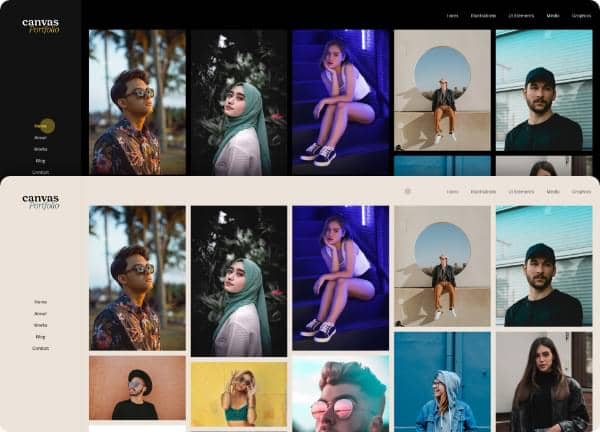
The Portfolio demo set gives freelancers, creative agencies, photographers, and other visual professionals a focused starting point inside the Canvas multipurpose HTML5 template. It ships with two ready-to-customize pages, including a dark landing layout for promoting individual work and a light, single-creator portfolio template that puts the spotlight on the maker behind the projects.
Both pages lean on Canvas's theme defaults for typography and share the same color foundation built around a deep teal (#003638). Stretched section widths, side-header navigation, page-transition effects, and clean right-edge borders give the demo a confident, gallery-like feel that keeps attention on imagery and case study content rather than chrome.
What's included
| Page | Description |
|---|---|
demo-portfolio.html |
Portfolio - Landing Page / Canvas acts as the marketing entry point, combining an intro statement, featured project highlights, service overviews, and a contact call to action aimed at converting visitors into leads. |
demo-portfolio-light.html |
Alex Gorge Portfolio - Light / Canvas presents a single-creator case study layout with an about section, selected works gallery, and personal bio designed to read like an artist's online resume. |
The demo's own styles live in demos/portfolio/portfolio.css. Shared framework styles come from style.css and css/font-icons.css.
The full editing guide is in the dashboard
Step-by-step customization, the complete settings reference, and copy-paste code are available to registered Canvas users. Creating an account is free.
Required files
CSS: demos/portfolio/portfolio.css