
Resume Builder Demo: Included Pages & How to Customize It
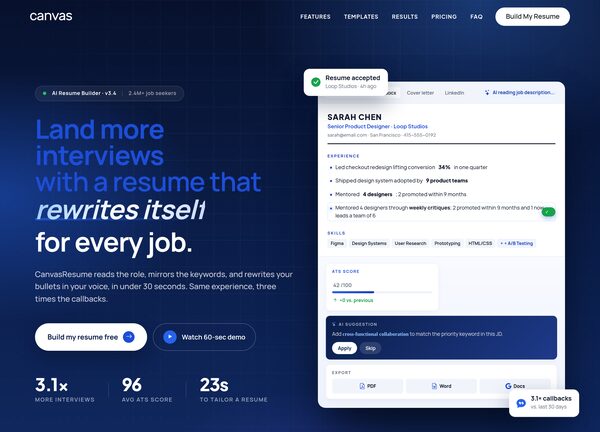
CanvasResume is a focused demo of the Canvas template aimed at anyone building an AI assisted resume product, from solo founders and career coaches to SaaS teams launching a job search tool. It ships as a single, polished marketing page that walks visitors from the value proposition through features, how it works, sample outputs, pricing and frequently asked questions, all wrapped in a clean, confident layout. The design uses Plus Jakarta Sans for headings and Manrope for body text, a steady blue theme anchored on #1d4ed8, a stretched layout that uses the full width of the screen, and a light interface that keeps attention on the product and the writing on the resume itself.
The personality is professional and reassuring rather than flashy, the kind of site that earns trust before a visitor reaches the sign up button. Generous spacing, restrained typography and a calm color palette let screenshots, sample resumes and feature lists do the talking, while short supporting copy explains how the AI rewrites bullet points, tailors applications and optimizes for applicant tracking systems. It is built to demonstrate how a single Canvas page can carry a complete product story from first impression to conversion.
What's included
| Page | Description |
|---|---|
demo-resume-builder.html |
A complete single page resume builder marketing site with hero, AI feature highlights, step by step how it works section, resume samples, pricing plans, testimonials and FAQ, styled in a light stretched layout with the #1d4ed8 blue accent. |
The demo's own styles live in demos/resume-builder/resume-builder.css. Shared framework styles come from style.css and css/font-icons.css.
The full editing guide is in the dashboard
Step-by-step customization, the complete settings reference, and copy-paste code are available to registered Canvas users. Creating an account is free.
Required files
CSS: demos/resume-builder/resume-builder.css