
Forum Demo: Included Pages & How to Customize It
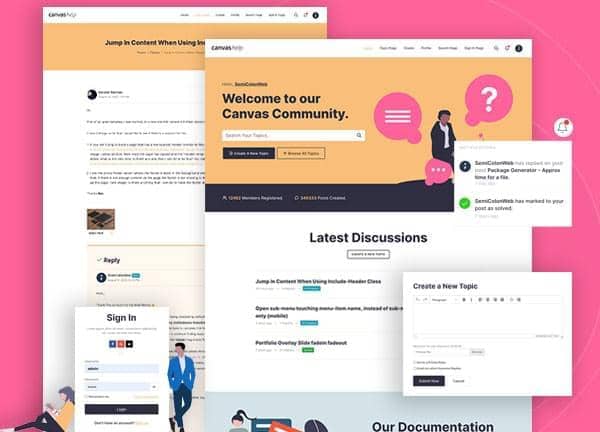
Canvas includes a dedicated Forum and Community demo for anyone who wants to launch a discussion driven website without rebuilding components from scratch. It comes with a complete set of pages for browsing topics, reading individual discussions, signing in and out, editing a profile, viewing another member, and searching across the board, so a working community site can go live in very little time.
The look leans warm and welcoming, built around a soft amber theme color set in Inter typography and laid out in a stretched format with a full header and a search overlay that opens from the nav. It feels less like a corporate help desk and more like a friendly member forum, with room for avatars, signatures, badges, and long thread views.
What's included
| Page | Description |
|---|---|
demo-forum.html |
The Forums landing page lists active categories and recent topics so visitors can jump straight into the conversations that matter to them. |
demo-forum-edit.html |
The Edit Profile page lets a signed in member update their avatar, signature, bio, and account details. |
demo-forum-profile.html |
The Profile page showcases a member's activity, stats, and recent posts in a single readable view. |
demo-forum-search-result.html |
The Search Result page displays matching threads and posts pulled from across the forum based on a user's query. |
demo-forum-signin.html |
The Sign In page provides a clean form for returning members to access their accounts and jump back into discussions. |
demo-forum-signout.html |
The Sign Out page confirms a member has been logged out and offers clear next steps back into the community. |
demo-forum-single.html |
The Topic Discussion page presents a full thread with original post, replies, and a composer for adding a new response. |
The demo's own styles live in demos/forum/forum.css. Shared framework styles come from style.css and css/font-icons.css.
The full editing guide is in the dashboard
Step-by-step customization, the complete settings reference, and copy-paste code are available to registered Canvas users. Creating an account is free.
Required files
CSS: demos/forum/forum.css