
Skincare Demo: Included Pages & How to Customize It
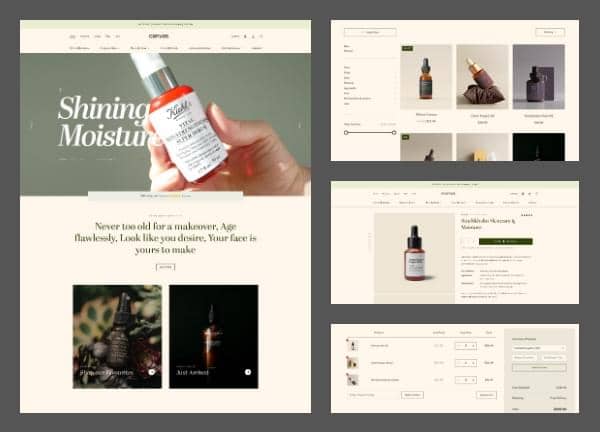
Canvas includes a fully built skincare and beauty store demo designed for indie beauty brands, organic cosmetics shops, esthetician studios, and small apothecary labels that want a calm, trustworthy storefront without writing a line of code. The demo ships with a home page, product listing, single product detail, cart, account login, contact, and a combined FAQs and shipping page, all styled to feel clean, editorial, and ingredient focused.
The layout uses a stretched container and a compact small header so product imagery and botanical photography stay the visual focus, while the deep olive theme color sets a grounded, natural tone across every page. Typography follows the Canvas defaults, giving the demo a refined serif-meets-sans pairing that reads well on long ingredient lists, routine guides, and brand storytelling sections.
What's included
| Page | Description |
|---|---|
demo-skincare.html |
The home page introduces the Skincare & Beauty Store with hero imagery, featured collections, ingredient spotlights, and brand story blocks tailored to the skincare niche. |
demo-skincare-cart.html |
The cart page lists selected products with quantity controls, order summary, shipping notes, and a checkout call to action. |
demo-skincare-contact.html |
The contact page provides a contact form, store location details, business hours, and social links for the skincare brand. |
demo-skincare-faqs.html |
The FAQs and shipping info page answers common customer questions about ingredients, returns, and delivery for the skincare store. |
demo-skincare-login.html |
The login page lets returning customers sign in to view order history, manage subscriptions, and update their skincare account details. |
demo-skincare-shop.html |
The products page displays the full skincare catalog with category filters, sorting options, and product cards built for beauty ecommerce. |
demo-skincare-single.html |
The single product page showcases the Stockholm Skincare Moisture Serum with ingredient details, usage directions, reviews, and related products. |
The demo's own styles live in demos/skincare/skincare.css. Shared framework styles come from style.css and css/font-icons.css.
The full editing guide is in the dashboard
Step-by-step customization, the complete settings reference, and copy-paste code are available to registered Canvas users. Creating an account is free.
Required files
CSS: demos/skincare/skincare.css