
Mortgage Demo: Included Pages & How to Customize It
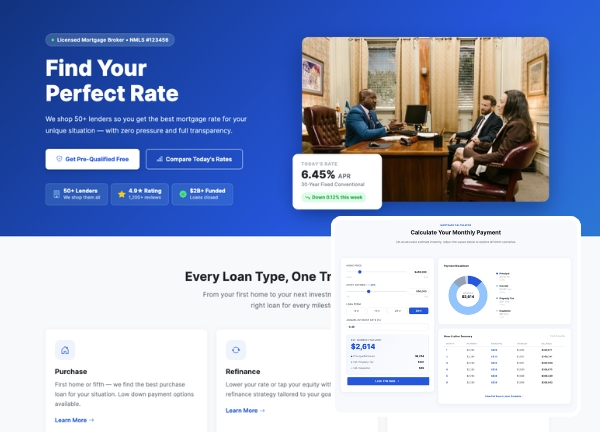
Canvas adapts effortlessly to financial services, and the Mortgage demo is built for brokers, loan officers, and lending agencies that need to convert visitors into qualified leads. It combines a clean editorial structure with trust building sections like rate tables, lender comparisons, and an FAQ that addresses the questions borrowers ask most often. The result is a professional site that feels approachable instead of corporate.
Design wise, the demo uses Canvas's stretched layout with a full width header to give the hero area room to breathe, while the default blue accent ties the brand together across every section. Typography follows the theme defaults so headings stay crisp and body copy remains easy to scan on calculators, rate cards, and long form guides. It ships as a single ready to customize page so you can launch a focused landing experience quickly.
What's included
| Page | Description |
|---|---|
demo-mortgage.html |
Find Your Perfect Rate homepage for ClearPath Mortgage Brokers, featuring a hero call to action, rate comparison tools, lender profiles, application steps, testimonials, and a borrower FAQ. |
The demo's own styles live in demos/mortgage/mortgage.css. Shared framework styles come from style.css and css/font-icons.css.
The full editing guide is in the dashboard
Step-by-step customization, the complete settings reference, and copy-paste code are available to registered Canvas users. Creating an account is free.
Required files
CSS: demos/mortgage/mortgage.css