
Architecture Firm Demo: Included Pages & How to Customize It
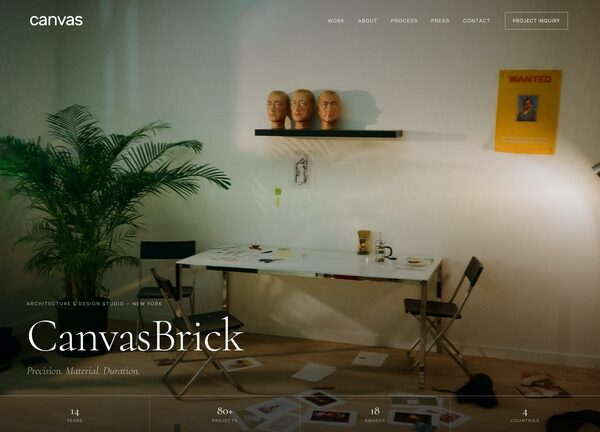
Canvas for Architecture Firms is a demo built for studios that want their portfolio to feel as considered as their built work. It pairs a near-black theme color (#111111) with serif headlines in Cormorant and clean sans-serif body text in Manrope, giving every project page the calm, editorial tone of an architecture monograph rather than a typical agency site.
The demo ships with a single page, demo-architecture-firm.html, that covers the full studio narrative: an intro, the practice areas, featured projects with imagery, the team, and a contact section. Stretched layout choices keep project photography wide and unobstructed, while the light, not-dark interface lets material samples, plan drawings, and site photographs carry the visual weight.
What's included
| Page | Description |
|---|---|
demo-architecture-firm.html |
A complete single-page site for CanvasBrick Architecture that introduces the studio's philosophy, lists practice areas such as residential, cultural, and adaptive reuse, walks through featured built and in-progress projects, introduces the principals and team, and closes with studio and contact details. |
The demo's own styles live in demos/architecture-firm/architecture-firm.css. Shared framework styles come from style.css and css/font-icons.css.
The full editing guide is in the dashboard
Step-by-step customization, the complete settings reference, and copy-paste code are available to registered Canvas users. Creating an account is free.
Required files
CSS: demos/architecture-firm/architecture-firm.css