
Nonprofit Demo: Included Pages & How to Customize It
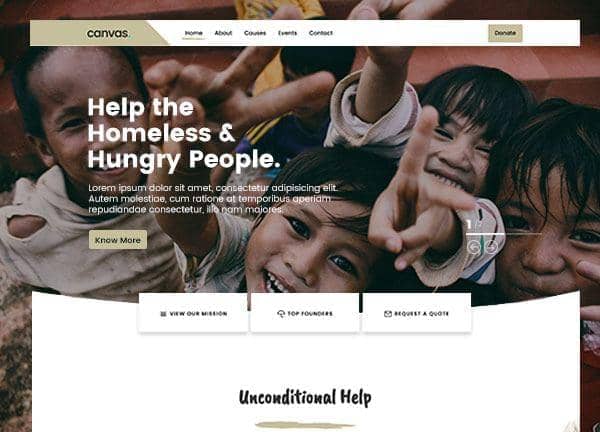
Built for nonprofits, NGOs, and charitable organizations, the Nonprofit demo provides a complete starting point for telling your mission story and driving donations. The layout uses a generous stretched width with a slim top header so your cause imagery and calls to action stay front and center.
Type is set in Caveat Brush for handwritten accents and Poppins for body copy, giving the site a warm, approachable feel without losing readability. An earthy khaki accent color (#C6C09C) ties the palette together and reinforces a grounded, community-minded tone. The demo ships with five pages covering everything from your homepage to individual cause and event detail views.
What's included
| Page | Description |
|---|---|
demo-nonprofit.html |
The landing page that introduces your organization, highlights key campaigns, and funnels visitors toward donating, volunteering, or reading more. |
demo-nonprofit-about.html |
An About Us page dedicated to your story, team, values, and the impact your nonprofit has made so far. |
demo-nonprofit-causes-single.html |
A detailed cause page for the Clean Water for All campaign, presenting the problem, goals, and donation call to action. |
demo-nonprofit-causes.html |
A listing page that showcases active fundraising causes with summaries, progress visuals, and links to each individual campaign. |
demo-nonprofit-events.html |
An events calendar page where supporters can browse upcoming fundraisers, galas, volunteer drives, and community activities. |
The demo's own styles live in demos/nonprofit/nonprofit.css. Shared framework styles come from style.css and css/font-icons.css.
The full editing guide is in the dashboard
Step-by-step customization, the complete settings reference, and copy-paste code are available to registered Canvas users. Creating an account is free.
Required files
CSS: demos/nonprofit/nonprofit.css