
UX Course Demo: Included Pages & How to Customize It
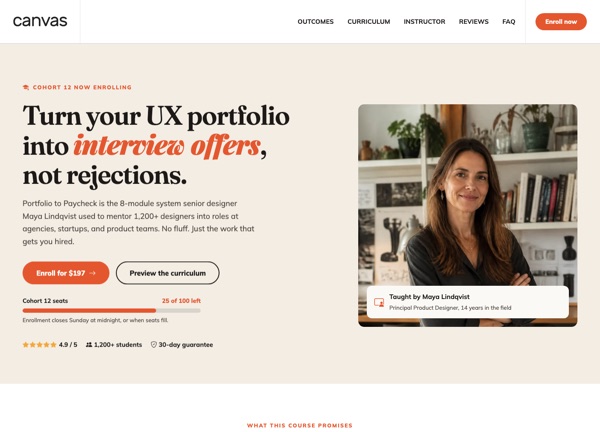
The UX Course demo is built for design educators, career coaches, and independent creators who sell a flagship program to working designers and developers. It frames the offer as a transformation story, moving from "portfolio anxiety" to "paid practice", so the homepage leads with curriculum, outcomes, and instructor credibility before any pricing friction.
This single-page layout uses Canvas's stretched, full-header configuration with non-sticky navigation to keep the course pitch above the fold during long reading sessions. The palette centers on a warm terracotta accent (#E4572E) paired with editorial Fraunces headlines and friendly Mulish body copy, giving the demo a confident, classroom-meets-magazine feel rather than a generic SaaS look.
What's included
| Page | Description |
|---|---|
demo-ux-course.html |
Portfolio to Paycheck is the complete landing page for a UX portfolio course, pairing a hero pitch with curriculum modules, instructor bio, testimonials, and an enrollment call to action. |
The demo's own styles live in demos/ux-course/ux-course.css. Shared framework styles come from style.css and css/font-icons.css.
The full editing guide is in the dashboard
Step-by-step customization, the complete settings reference, and copy-paste code are available to registered Canvas users. Creating an account is free.
Required files
CSS: demos/ux-course/ux-course.css