
Hostel Demo: Included Pages & How to Customize It
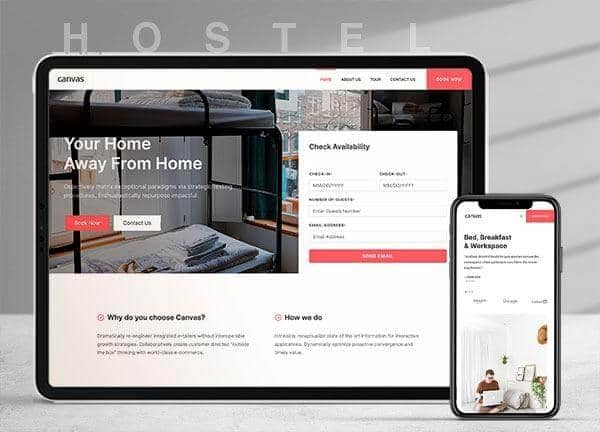
The Hostel demo turns Canvas into a warm, practical booking site for hostels, co-living spaces, and budget-friendly group accommodations. It ships with five ready-made pages that handle the full guest journey, from browsing tours and rooms to checking availability and getting in touch with the front desk.
The design pairs the rounded Inter typeface with the editorial feel of PT Serif, while a coral accent color (#FD5C63) gives CTAs and pricing a friendly pop. A stretched layout with a full-size header and zero borders keeps the focus on photography of shared spaces, dorms, and common areas, helping independent operators and small chains present their property with confidence.
What's included
| Page | Description |
|---|---|
demo-hostel.html |
The landing page introduces the property, highlights amenities and dorm types, and routes visitors toward booking, tours, or direct contact. |
demo-hostel-about.html |
An about page that tells the hostel's story, shares the team, and explains the co-living ethos behind the brand. |
demo-hostel-contact.html |
A contact page with location details, a map, opening hours, and a form for reservations, group bookings, and general questions. |
demo-hostel-single.html |
A room detail page for the Canvas Penthouse, showcasing bed configurations, amenities, pricing, and a booking call to action. |
demo-hostel-tour.html |
A guided tour page that walks guests through the property's floors, rooms, and shared spaces before they commit to a bed. |
The demo's own styles live in demos/hostel/hostel.css. Shared framework styles come from style.css and css/font-icons.css.
The full editing guide is in the dashboard
Step-by-step customization, the complete settings reference, and copy-paste code are available to registered Canvas users. Creating an account is free.
Required files
CSS: demos/hostel/hostel.css